
📥 Discounts Rules
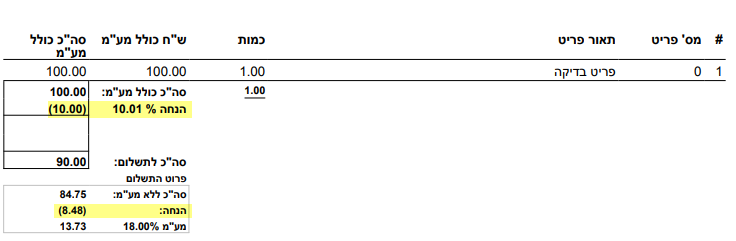
Sending a discount in a document production
In the Discount Section of the Document
To set the discount amount and type send request parameters:
'discount_type'
1 - Percentage
2 - Amount
Will set the discount value type.
'discount_value'
The percentage/amount discount value.
Discount by amount will not be possible if the document format type is items Vat combined (לא חייב מע"מ)
The discount will show on the items list summary as follows:
Discount as an Item
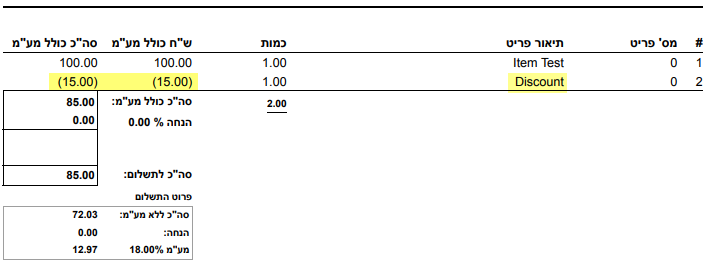
It is possible to send the discount as a negative amount of the item under the items list.
Send in request parameters items array:
'price_nis'
or
'price_mtc'
By the item currency - nis for ILS and mtc for all others
Send a negative amount of the discount.
'description'
Send the description of the item that represent the discount.
The discount will show as an item in the items list as follows:
Display and Calculate Discount in the Item line
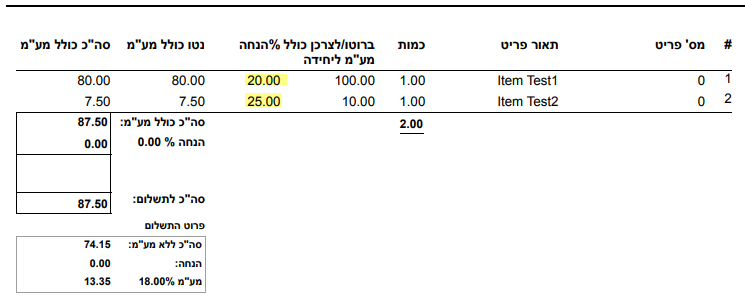
The discount will appear in each item line in the items list - with amounts before and after.
Send the request parameter values:
'bruto_price_nis'
The Item price before the discount
'price_nis'
The item price after the discount
The system will calculate the discount in percentage and display it on each item line.
Terms of USE
- The document format needs to be - 'עסק מסחרי 3 הנחה בשורה ללא מט"ח'.
- This option won’t work with MTC currency and an English document
The discount calculation on the items line will appear as follows:
Updated about 1 year ago